Using a Plugin Execution Provider Library
This page provides a reference on how to use a plugin EP library with the ONNX Runtime API.
The code on this page is C++ and uses the ONNX Runtime C++ API.
There are also some usage examples in other languages:
Contents
- Plugin EP library registration
- Session creation with explicit OrtEpDevice(s)
- Session creation with automatic EP selection
- API reference
Plugin EP library registration
The sample application code below uses the following API functions to register and unregister a plugin EP library.
const char* lib_registration_name = "ep_lib_name";
Ort::Env env;

// Register plugin EP library with ONNX Runtime.
env.RegisterExecutionProviderLibrary(
  lib_registration_name,   // Registration name can be anything the application chooses.
  ORT_TSTR("ep_path.dll")  // Path to the plugin EP library.
);

{
  Ort::Session session(env, /*...*/);
  // Run a model ...
}

// Unregister the library using the application-specified registration name.
// Must only unregister a library after all sessions that use the library have been released.
env.UnregisterExecutionProviderLibrary(lib_registration_name);
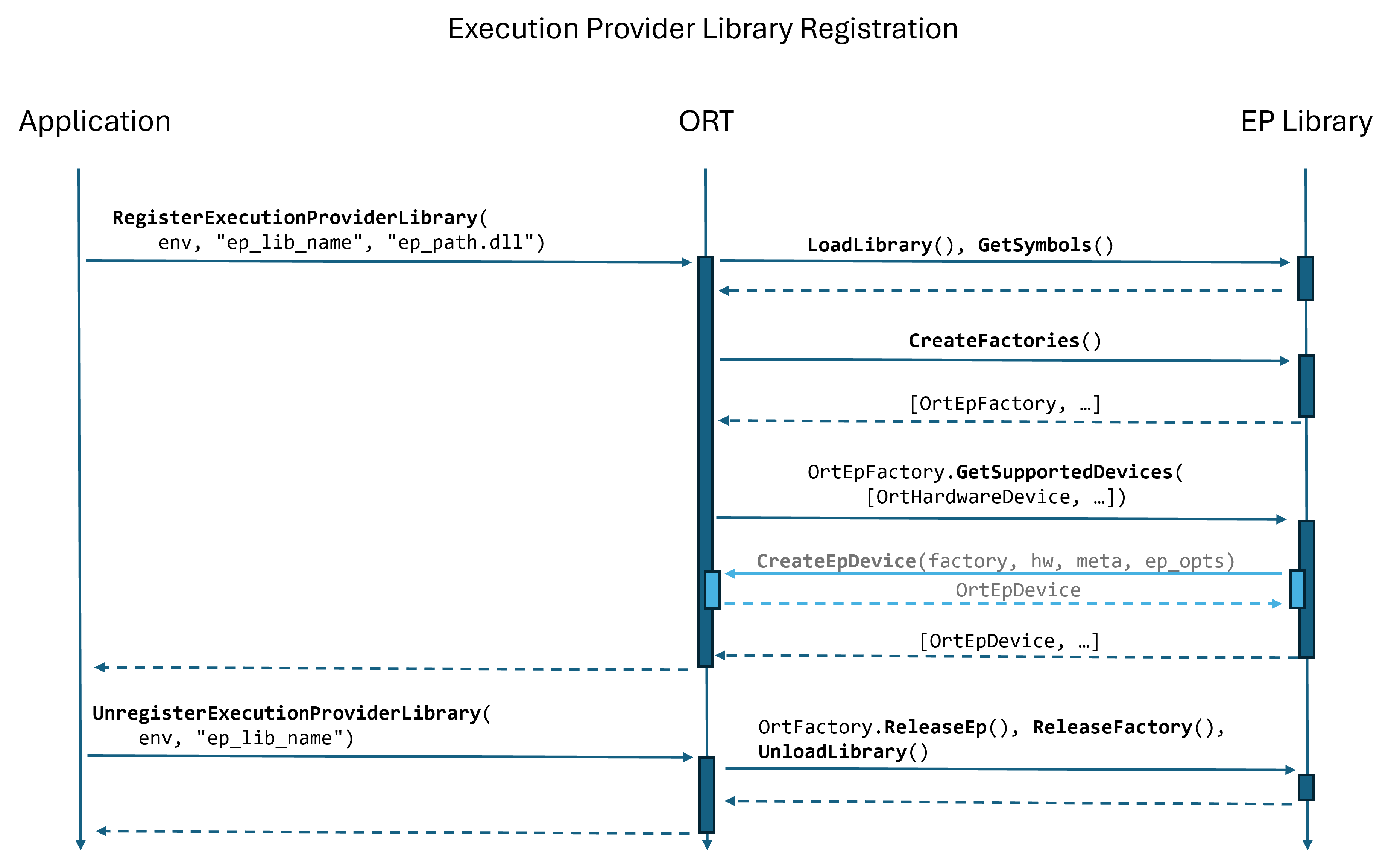
As shown in the following sequence diagram, registering a plugin EP library causes ONNX Runtime to load the library and call the library’s CreateEpFactories() function. During the call to CreateEpFactories(), ONNX Runtime determines the subset of hardware devices supported by each factory by calling OrtEpFactory::GetSupportedDevices() with all hardware devices that ONNX Runtime discovered during initialization.
The factory returns OrtEpDevice instances from OrtEpFactory::GetSupportedDevices(). Each OrtEpDevice instance pairs a factory with a hardware device that the factory supports. For example, if a single factory instance supports both CPU and NPU, then the call to OrtEpFactory::GetSupportedDevices() returns two OrtEpDevice instances:
- ep_device_0: (factory_0, CPU)
- ep_device_1: (factory_0, NPU)
Session creation with explicit OrtEpDevice(s)
The application code below uses the API function SessionOptionsAppendExecutionProvider_V2 to add an EP from a library to an ONNX Runtime session.
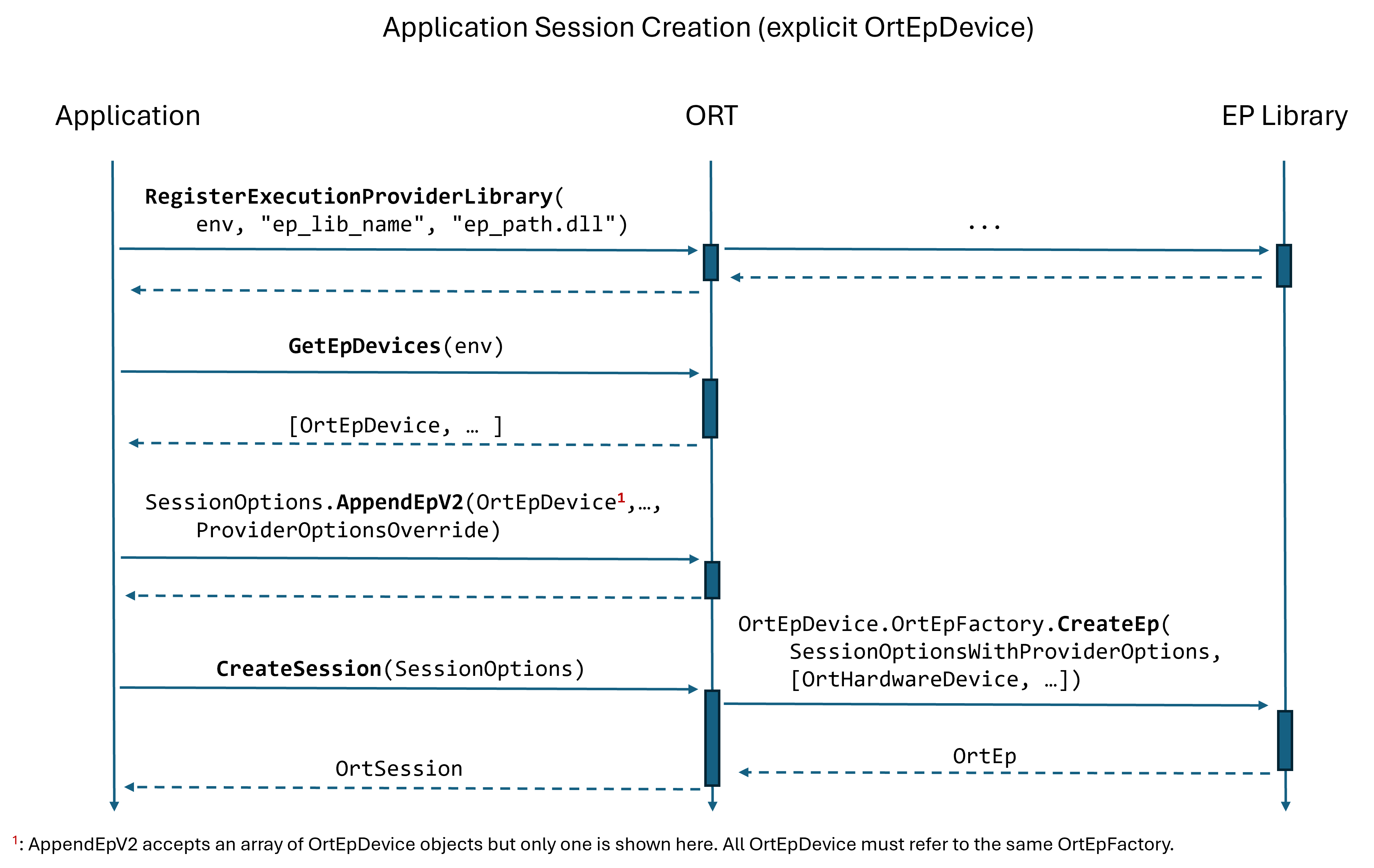
The application first calls GetEpDevices to get a list of OrtEpDevices available to the application. Each OrtEpDevice represents a hardware device supported by an OrtEpFactory. The SessionOptionsAppendExecutionProvider_V2 function takes an array of OrtEpDevice instances as input, where all OrtEpDevice instances refer to the same OrtEpFactory.
Ort::Env env;
env.RegisterExecutionProviderLibrary(/*...*/);

{
  std::vector<Ort::ConstEpDevice> ep_devices = env.GetEpDevices();

  // Find the Ort::EpDevice for "my_ep".
  std::vector<Ort::ConstEpDevice> selected_ep_devices{};
  for (Ort::ConstEpDevice ep_device : ep_devices) {
    if (std::strcmp(ep_device.EpName(), "my_ep") == 0) {
      selected_ep_devices.push_back(ep_device);
      break;
    }
  }

  if (selected_ep_devices.empty()) {
    // Did not find EP. Report application error ...
  }

  Ort::KeyValuePairs ep_options(/*...*/);  // Optional EP options.
  Ort::SessionOptions session_options;
  session_options.AppendExecutionProvider_V2(env, selected_ep_devices, ep_options);

  Ort::Session session(env, ORT_TSTR("model.onnx"), session_options);

  // Run model ...
}

env.UnregisterExecutionProviderLibrary(/*...*/);
As shown in the following sequence diagram, ONNX Runtime calls OrtEpFactory::CreateEp() during session creation in order to create an instance of the plugin EP.
Session creation with automatic EP selection
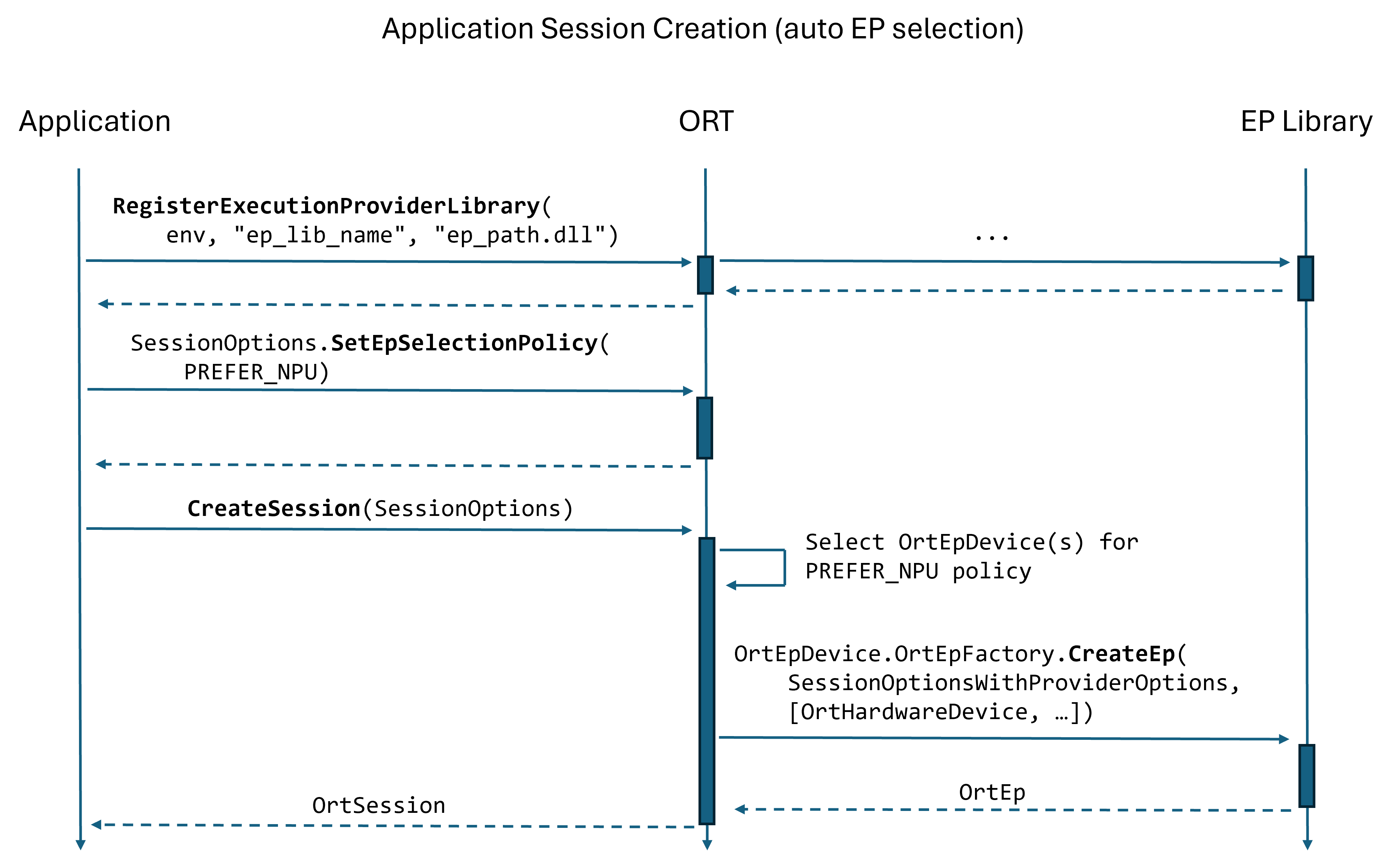
The application code below uses the API function SessionOptionsSetEpSelectionPolicy to have ONNX Runtime automatically select an EP based on the user’s policy (e.g., PREFER_NPU). If the plugin EP library registered with ONNX Runtime has a factory that supports NPU, then ONNX Runtime may select an EP from that factory to run the model.
Ort::Env env;
env.RegisterExecutionProviderLibrary(/*...*/);

{
  Ort::SessionOptions session_options;
  session_options.SetEpSelectionPolicy(OrtExecutionProviderDevicePolicy::PREFER_NPU);

  Ort::Session session(env, ORT_TSTR("model.onnx"), session_options);

  // Run model ...
}

env.UnregisterExecutionProviderLibrary(/*...*/);
API reference
The following table lists the API functions related to plugin EP library registration and using a plugin EP with a session.
| Function | Description |
|---|---|
| RegisterExecutionProviderLibrary | Register an EP library with ORT. The library must export the CreateEpFactories and ReleaseEpFactory functions. |
| UnregisterExecutionProviderLibrary | Unregister an EP library with ORT. Caller MUST ensure there are no OrtSession instances using the EPs created by the library before calling this function. |
| GetEpDevices | Get the list of available OrtEpDevice instances. Each OrtEpDevice instance contains details of the execution provider and the device it will use. |
| SessionOptionsAppendExecutionProvider_V2 | Append the execution provider that is responsible for the provided OrtEpDevice instances to the session options. |
| SessionOptionsSetEpSelectionPolicy | Set the execution provider selection policy for the session. Allows users to specify a device selection policy for automatic EP selection. If custom selection is required please use SessionOptionsSetEpSelectionPolicyDelegate instead. |
| SessionOptionsSetEpSelectionPolicyDelegate | Set the execution provider selection policy delegate for the session. Allows users to provide a custom device selection policy for automatic EP selection. |